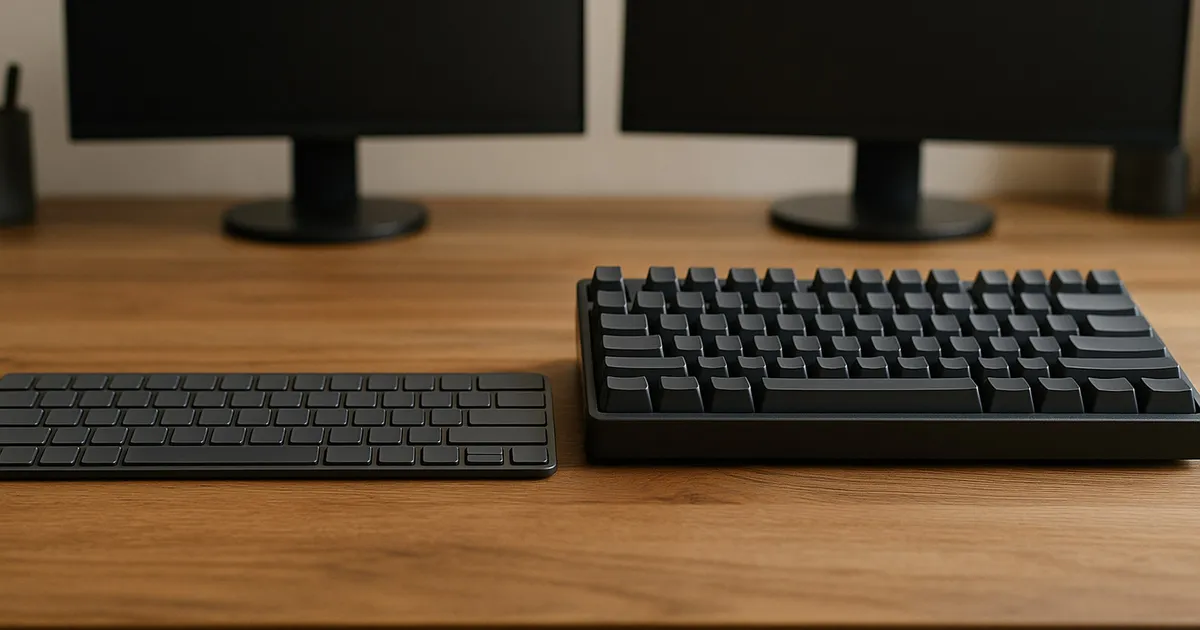
For a shared home office, the safest default is a low-profile board with a non-clicky switch. It reduces case height and avoids the intentionally sharp sound of clicky switches. Choose a full-height mechanical keyboard when replaceable switches, broader keycap compatibility, or a more configurable typing feel matters enough to accept the taller case and a more involved noise check.
Among the three documented options here, the Logitech MX Mechanical Mini Tactile Quiet is the simplest multi-device office choice. The Keychron K3 Max hot-swap Brown is the low-profile choice for people who want remapping and replaceable switches. The Keychron V1 Max hot-swap Brown is the full-height choice with the widest conventional switch and keycap path.
Quick decision for a two-person room
| If this describes the desk | Better starting point | Why | Check before buying |
|---|---|---|---|
| Calls happen within a few feet of the keyboard | Low-profile, non-clicky | Less key travel and a thinner case can reduce one source of impact noise | No keyboard is silent; verify the exact switch and return policy |
| One keyboard moves among two or three computers | Logitech MX Mechanical Mini | Dedicated Easy-Switch keys and Bluetooth or Logi Bolt support | Logi Bolt receiver availability and host support |
| You want low height but also remapping and switch replacement | Keychron K3 Max hot-swap | QMK/VIA plus a replaceable low-profile switch path | The listing must say hot-swappable and name the exact switch |
| You expect to change switches, stabilizers, or keycaps later | Keychron V1 Max | Standard-profile ecosystem and hot-swap sockets | Taller case, switch noise, and desk resonance |
| You use a full number pad every day | None of these compact models | All three are 75% layouts without a numpad | Choose the full-size variant or a separate numpad |
The useful distinction is not “mechanical equals loud” and “low-profile equals quiet.” Low-profile keyboards can also use mechanical switches, including clicky ones. Sound depends on the switch mechanism, bottom-out force, return impact, stabilizers, case, desk, mat, and typing force. Form factor changes the starting conditions, but the exact variant determines the result.
Our low-profile office pick: Logitech MX Mechanical Mini
Logitech sells the MX Mechanical Mini in Tactile Quiet, Linear, and Clicky switch versions. For a shared room, the Tactile Quiet variant is the relevant one. The Clicky version deliberately adds an audible click and is the wrong default when another person takes calls nearby. The Linear version removes the tactile bump, but “linear” does not mean silent because the key can still strike the bottom and return.
The Mini is a 75% layout: it keeps dedicated arrow keys and a navigation column but drops the number pad. It can pair with as many as three devices through Bluetooth Low Energy or a Logi Bolt receiver and switch among them with dedicated keys. That is useful when one desk alternates between a work laptop, personal computer, and tablet.
The tradeoff is repair and software control. Logitech does not present the switches as hot-swappable, so this is not the board to buy with a plan to replace individual switches. Basic typing and device switching do not require a customization utility, but application shortcuts and deeper remapping use Logi Options+. Logitech publishes current Windows and macOS downloads and support pages, yet software support is still an ownership dependency that a plain wired keyboard avoids.
The MX Mechanical Mini is the premium-priced option in this set. The extra cost buys a finished multi-device workflow, not a more serviceable switch system. Compare the current checkout total with the Keychron options on the same day, including any receiver or palm rest the desk needs. Buy it when Easy-Switch and the low front edge solve actual desk problems; skip it when wired operation and replaceable parts matter more.
Check Logitech Mx Mechanical Mini Tactile Quiet on Amazon.
The customizable low-profile choice: Keychron K3 Max
The K3 Max combines a 75% low-profile layout with three connection paths: USB-C, a 2.4GHz receiver, and Bluetooth. Keychron provides Mac and Windows keycaps and a physical system switch. QMK/VIA support lets you change key assignments in a browser-based configurator rather than keeping a vendor utility running in the background.
Variant control matters more than the family name. Keychron sells both hot-swappable and non-hot-swappable K3 Max configurations, and switch colors differ. Our shopping path is bounded to the hot-swappable Gateron low-profile Brown version. Brown is a non-clicky tactile switch, but it is not a silent switch. A typist who bottoms out every stroke can still be clearly audible across a small room.
The hot-swap model is easier to maintain than the Logitech because a failed compatible switch can be removed without soldering. It is not as open an ecosystem as the V1 Max. Low-profile switches and keycaps have tighter compatibility constraints, and a standard full-height MX-style switch is not a substitute. Before ordering replacement parts, match the K3 Max revision, socket, stem, stabilizer, and keycap profile.
The K3 Max is the better fit when low case height and remapping both matter. It is a worse fit when the buyer expects every “K3” listing to contain the same switch plate, switch type, lighting, or keycaps. Save the exact configuration shown at checkout and inspect the box label during the return period.
Check Keychron K3 Max Hot Swap Brown on Amazon.
The full-height maintenance pick: Keychron V1 Max
The V1 Max is also a compact 75% wireless keyboard with USB-C, 2.4GHz, Bluetooth, and QMK/VIA. Its key difference is physical: it uses a conventional full-height mechanical platform. The hot-swap board accepts compatible standard-profile switches, opening a much larger replacement and tuning market than a low-profile model.
That flexibility is valuable when one switch fails or when the room requires a quieter setup later. Compatible silent tactile or silent linear switches can reduce switch-generated noise, although they cannot eliminate stabilizer, keycap, case, or desk sound. Hot-swap also avoids soldering for routine switch replacement. Keycaps are easier to source in standard MX-style families, but the layout still needs the correct sizes for the right Shift and navigation keys.
The V1 Max is taller than the other two boards. Measure desk-to-key height rather than assuming a palm rest is medically necessary. A rest changes wrist and forearm position, but this article does not make an ergonomic or pain-treatment claim. The practical test is whether the front edge interferes with a neutral, comfortable setup at the existing chair and desk height.
A gasket-mounted case and internal foam can change the sound character, but those construction terms do not establish quietness. The desk surface can amplify low-frequency impact, and a hollow table can make a restrained board sound more intrusive. A desk mat may reduce transmitted vibration, but it should not be treated as a substitute for a non-clicky switch and controlled typing force.
Check Keychron V1 Max Hot Swap Brown on Amazon.
Noise: switch label first, construction second
For a shared office, reject a clicky switch unless both occupants explicitly accept it. Clicky switches add a click mechanism to the normal bottom-out and return sounds. Tactile and linear switches omit that deliberate click, but neither category guarantees low noise.
Use this order when comparing variants:
- Identify the exact switch. “Mechanical keyboard” is too broad. Record the manufacturer, switch family, color or model, and whether it is clicky, tactile, linear, or damped.
- Confirm whether the switch is replaceable. Hot-swap can preserve the keyboard when a switch fails or the room’s noise needs change. Check socket compatibility rather than assuming all mechanical switches fit.
- Inspect large keys. Space, Enter, Backspace, and Shift use stabilizers and can sound different from letter keys. A listing that only describes the switch does not describe stabilizer noise.
- Account for the desk. A thin or hollow desktop can transmit impact. Compare on the actual surface, with and without the usual mat, before changing several keyboard parts.
- Keep the return period open. Manufacturer sound samples and reviews use different rooms, microphones, distances, and gain. They cannot predict how the board will carry into a nearby call microphone.
RTINGS has family-level reviews for the Logitech MX Mechanical, Keychron K Max low-profile series, and Keychron V Max series. Those tests are useful for checking family design and measured behavior, but the tested size and switch can differ from the exact shopping variant. We therefore do not publish a decibel ranking across these three configurations.
Layout and desk fit
All three recommendations are 75% boards. They preserve arrows and navigation keys in less width than a tenkeyless or full-size keyboard. The saved width can bring a mouse closer to the body’s centerline and leave more room between two workstations. The cost is the missing number pad and a tighter navigation cluster.
A compact layout is a poor trade for someone entering numbers for hours. In that case, compare a full-size MX Mechanical, Keychron K5 Max, or V6 Max, or add a separate numpad that can sit on either side. Do not buy a 75% keyboard because it photographs neatly and then spend every workday using an awkward number row.
Low-profile case height can help a shallow keyboard tray or a desk where the front edge of a full-height case feels intrusive. Full-height gives more switch and keycap choice. Neither automatically fixes posture. Chair height, desk height, forearm support, keyboard angle, and reach all remain part of the setup.
Mac, Windows, and device switching
Logitech prints combined legends and supports current Windows and macOS systems through Bluetooth or Logi Bolt. ChromeOS, Linux, iPadOS, iOS, and Android support varies by feature; the core keyboard path is broader than the Logi Options+ customization path. Check the current compatibility table for the exact host rather than assuming software features follow Bluetooth pairing.
Keychron includes Mac and Windows keycaps and uses a physical OS-mode switch. QMK/VIA can move modifiers and create layers, but corporate browsers or locked-down work laptops may block WebHID access to the configurator. The saved keymap remains on the keyboard; configuration access is the step that may require another computer.
For wireless use, test wake behavior, device switching, and the receiver on the real dock. A metal desk, crowded 2.4GHz spectrum, or receiver placed behind a desktop can change reliability. Start with the receiver in a direct, visible USB port before blaming the keyboard. If the laptop already depends on a crowded dock, our USB-C dock compatibility guide explains why connector shape alone does not establish a stable peripheral path.
If the unresolved question is whether the laptop should use Thunderbolt, USB-C/MST, or DisplayLink for two monitors, see our dual-monitor dock path comparison before choosing the keyboard connection layout.
If your desk already uses a working Thunderbolt 4 dock and the question is whether a new host or peripheral plan warrants a newer generation, use our Thunderbolt 5 versus Thunderbolt 4 dock upgrade guide before replacing hardware.
Maintenance and ownership lifespan
The Logitech path is appliance-like: charge it, pair it, and use the supported software when needed. The battery and switches are not presented as routine user-replaceable parts. Logitech lists a one-year limited hardware warranty on the US product page and offers a support portal, but the product page did not show a fixed software-support end date.
The K3 Max hot-swap variant permits compatible low-profile switch replacement and removable keycaps. The V1 Max broadens the part path with standard-profile switches and keycaps. Keychron publishes manuals, firmware, JSON keymaps, and disassembly-related resources, but model and revision still matter. Flashing firmware for a different board or revision can create a new problem, so use the exact support page and preserve the original configuration file.
Cleaning is simpler when loose debris is removed before liquid is introduced. Disconnect the cable, switch the board off, and use low-pressure air or a soft brush around the keycaps. Follow the manufacturer instructions before removing keycaps or switches. Hot-swap means a switch can be removed; it does not make the PCB spill-proof.
For long ownership, save the invoice, exact SKU, switch variant, layout, and support URLs. A future replacement search for “K3 keyboard switch” is not precise enough because the K3 family includes multiple revisions, switch plates, and configurations.
Value: compare the working setup
Compare the current total for the exact switch and layout, not the lowest family-level price shown in search results. Include any palm rest, receiver adapter, replacement switches, or separate number pad needed to make the board work at this desk. Recheck the variant, warranty, seller, return terms, and final total at checkout because configurations and retailer offers vary.
Add only costs the desk actually needs:
- a palm rest if the full-height case does not fit comfortably;
- a desk mat if surface resonance is a demonstrated problem;
- compatible replacement switches if the selected board is hot-swappable;
- a separate number pad if 75% saves space but numeric entry remains frequent;
- a receiver adapter only when the host lacks the required port.
Do not count hot-swap as savings unless you are willing to identify and replace a failed switch. Do not count multi-device pairing as value if the keyboard will remain connected to one desktop. The best-value board is the least expensive complete setup that satisfies the room’s noise, layout, host, and maintenance requirements.
What to buy
Choose the Logitech MX Mechanical Mini Tactile Quiet for a shared room that needs low height, straightforward switching among three devices, and minimal configuration. Skip it if switch replacement is a priority.
Choose the Keychron K3 Max hot-swap Brown when you need low-profile geometry plus QMK/VIA remapping and a replaceable switch path. Skip it if you want the broad standard-profile keycap and switch market.
Choose the Keychron V1 Max hot-swap Brown when maintenance, switch experimentation, and standard-profile parts outweigh the taller front edge. Skip it if the desk is shallow or the room cannot tolerate a full-height board’s impact sound without an in-room return-window check.
If the nearby microphone already picks up ordinary typing, no unmeasured keyboard recommendation can guarantee a fix. Start with a non-clicky exact variant, type on the real desk, and make a short call recording at the normal microphone position before the return window closes.
Frequently asked questions
Are low-profile keyboards always quieter than mechanical keyboards?
No. Many low-profile keyboards are mechanical, and some use clicky switches. A non-clicky low-profile board is a sensible starting point for a shared room, but switch design, typing force, stabilizers, case, and desk all affect sound.
Is the MX Mechanical Mini Tactile Quiet silent?
No. “Tactile Quiet” distinguishes that Logitech switch option from the Clicky version; it does not promise silence. Bottom-out, key return, and large stabilized keys remain audible.
Can standard mechanical switches go into a Keychron K3 Max?
Do not assume so. The K3 Max hot-swap variant uses compatible low-profile switches. Standard full-height MX-style switches belong to a different physical category. Match the exact board revision and Keychron compatibility guidance.
Which option is easiest to repair after one key fails?
The hot-swappable Keychron variants provide the clearest routine switch-replacement path. The V1 Max has the broader standard-profile parts ecosystem. The Logitech switches are not marketed as user hot-swappable.
Do these keyboards need an account?
Basic keyboard input does not require an account in the documented paths. Logitech’s advanced customization uses Logi Options+ software. Keychron remapping uses QMK/VIA; browser access may require WebHID permission, but mappings are stored on the keyboard. Recheck current software privacy and permission notices before installation.
Evidence boundary
We did not handle or sound-test these keyboards. Manufacturer specifications establish layout, switch offerings, connection paths, remapping, warranty, and replaceable-part claims. Independent family reviews provide context, but no public common protocol covers these exact three size, switch, desk, room, and microphone combinations. The recommendations are therefore fit and ownership decisions, not a measured quietness or latency ranking.
Sources
- Logitech MX Mechanical Mini product, specifications, and support: https://www.logitech.com/en-us/shop/p/mx-mechanical-mini.920-010550 and https://support.logi.com/hc/en-us/articles/5216332417815
- Logitech Logi Options+ privacy and permissions: https://www.logitech.com/en-us/software/logi-options-plus.html and https://www.logitech.com/en-us/legal/product-privacy-policy.html
- Keychron K3 Max product and manual: https://www.keychron.com/products/keychron-k3-max-qmk-via-wireless-custom-mechanical-keyboard and https://www.keychron.com/pages/keychron-k3-max-user-manual
- Keychron V1 Max product and manual: https://www.keychron.com/products/keychron-v1-max-qmk-via-wireless-custom-mechanical-keyboard and https://www.keychron.com/pages/keychron-v1-max-user-manual
- QMK and VIA documentation: https://docs.qmk.fm/ and https://www.caniusevia.com/
- RTINGS keyboard reviews: https://www.rtings.com/keyboard/reviews/logitech/mx-mechanical , https://www.rtings.com/keyboard/reviews/keychron/k5-max-k1-max-k3-max-etc , and https://www.rtings.com/keyboard/reviews/keychron/v5-max-v1-max-v2-max-etc