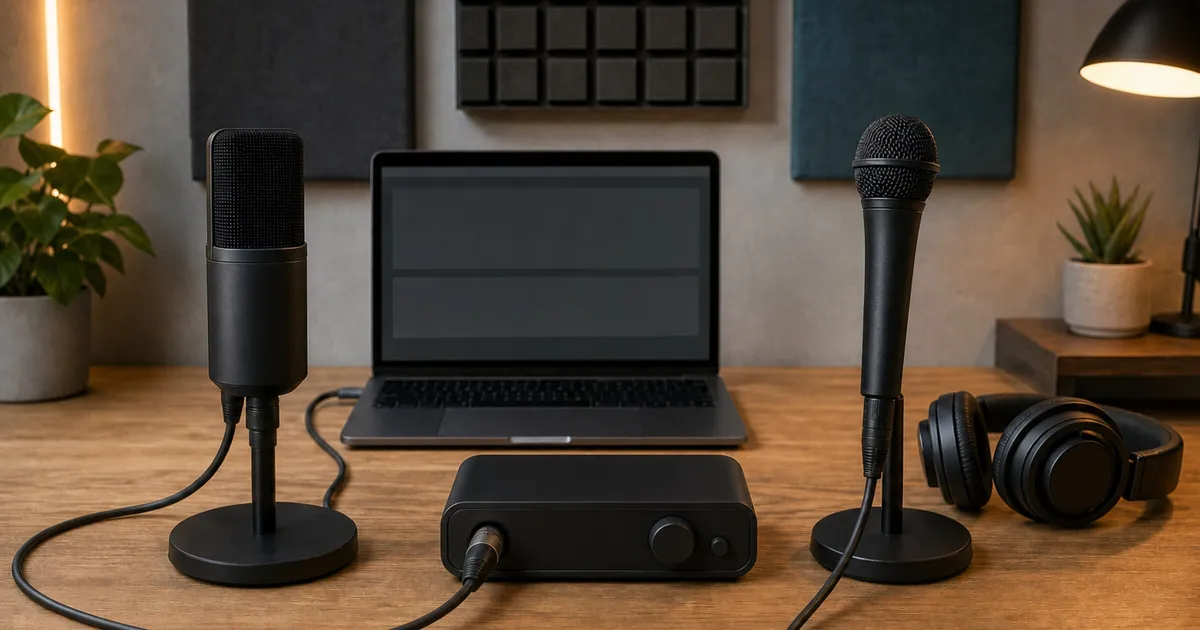
New creators should usually start with USB when one microphone feeds one computer. Choose XLR when you need an interface, multiple sources, hardware routing, or replaceable chain components. Hybrid microphones such as Shure MV7+ and Audio-Technica ATR2100x-USB let you start with USB and add XLR later. Connector type alone does not determine sound quality.
Fast decision
- Use USB for the shortest path: one microphone, one computer, one cable, and direct monitoring when the microphone provides it.
- Use a hybrid microphone for a staged upgrade: begin with USB, then add an interface only when the XLR workflow has a clear purpose.
- Use XLR for a modular chain: choose the microphone, preamp, monitoring, and input count separately when multiple sources or hardware routing justify the added parts.
- Do not pay for an upgrade path you will not use: a well-supported USB setup can remain the simpler long-term choice for a one-person desk.
If your shortlist is already down to the two USB-led workflows, our Shure MV7+ versus Elgato Wave:3 MK.2 comparison focuses on calls, streaming mixes, monitoring, mounting, and software dependence.
Price the complete recording chain
The microphone price is only comparable when every required part is counted. MV7+ includes a USB-C cable but still needs a stand or boom arm and headphones for a complete desk setup. ATR2100x-USB includes a small tripod, clamp, two USB cables, and an XLR cable, which reduces the number of immediate accessories. Wave:3 MK.2 includes its desk stand and USB cable but remains tied to USB.
An SM58-LC purchase begins a separate bill of materials: microphone, XLR cable, stand, interface, interface-to-host cable, and headphones. Scarlett Solo provides one microphone preamp and one instrument input, so it is suitable for one voice plus a guitar or similar source, not a two-person XLR conversation. A two-microphone podcast needs an interface with at least two microphone preamps.
Budget for positioning hardware before decorative extras. A stable arm or stand that places the capsule close to the speaker can improve the signal-to-room balance more reliably than buying a more expensive microphone and leaving it far away. Check thread adapters, desk-clamp clearance, shock-mount compatibility, and the combined weight of the microphone and mount.
A hybrid starting point: Shure MV7+
The MV7+ combines passive XLR, USB-C, and a 3.5mm monitor output. Over USB, it records up to 24-bit/48kHz and supports class-compliant paths on documented Windows, macOS, iOS, Android, and PS5 systems. Xbox is explicitly unsupported. The 3.5mm output provides latency-free monitoring.
The key boundary is that software settings do not affect the passive XLR output. Moving from USB to XLR changes the chain: you need an interface or preamp, XLR cable, host connection, and monitoring plan, and you lose the microphone’s USB processing on that passive output.
Check Shure MV7 Plus on Amazon.
An accessory-complete hybrid: ATR2100x-USB
Audio-Technica includes a folding tripod, stand clamp, USB-C-to-C cable, USB-C-to-A cable, and XLR cable. The microphone provides USB-C, XLR, and direct headphone monitoring and supports up to 24-bit/192kHz on the documented digital path.
The exact manual’s operating-system examples stop at older Windows and macOS versions, and the company does not publish XLR sensitivity or an interface-gain requirement in that manual. Confirm current host compatibility and allow enough interface gain before buying it specifically for XLR.
Check Audio Technica ATR2100X USB on Amazon.
A USB-only creator workflow: Elgato Wave:3 MK.2
Wave:3 MK.2 is a USB condenser microphone with a headphone output, onboard controls, and Wave Link software routing. The exact US sales SKU is 10MAO9901; the printed hardware model is 20MAO9901. Those numbers describe sales and hardware identity rather than two competing generations.
It has no XLR output. Choose it when software routing and a single-computer workflow matter more than a modular analog chain. Elgato’s product page lists macOS 14.2+, while the current Wave Link page lists macOS 15.0+; use the stricter floor until Elgato reconciles them. Marketplace effects require sign-in, while basic USB audio is not documented as account-dependent.
Check Elgato Wave 3 Mk2 on Amazon.
When XLR is worth the extra chain
The SM58-LC is a passive dynamic XLR microphone with published replaceable grille and cartridge parts and no software, account, firmware, or cloud dependency. The microphone-only LC variant does not include an XLR cable, stand, interface, or headphones.
Focusrite Scarlett Solo 4th Gen supplies one microphone preamp with 57dB gain, 48V phantom power, hardware direct monitoring, and up to 24-bit/192kHz conversion. Its hardware direct-monitor path avoids computer round-trip latency, although plugin processing is not heard on that direct path.
Check Shure SM58 Lc on Amazon.
Check Focusrite Scarlett Solo 4th Gen on Amazon.
Monitoring and latency paths
Direct monitoring lets you hear the input before a full trip through the computer. MV7+, ATR2100x-USB, and Wave:3 MK.2 provide headphone outputs on the microphone for their USB workflows. Scarlett Solo offers hardware direct monitoring for the XLR input. These paths help a speaker notice distance, plosives, clothing noise, and clipping without distracting software delay.
Direct does not always mean processed. Shure’s USB features apply in the MV7+ digital path, not the passive XLR output. Scarlett Solo’s hardware monitor path does not include plugins running in recording or streaming software. If hearing compression, noise reduction, or effects while speaking is essential, test the software-monitoring round trip at the chosen buffer size and sample rate.
Headphone volume and mix controls also differ. Confirm whether the device can balance microphone and computer playback, whether that control is physical or software-only, and whether the headphone output can comfortably drive your existing headphones. Published connector presence alone does not establish a shared loudness or latency result across these products.
Room, voice, and placement matter more than connector type
USB and XLR describe transport, not an automatic sound hierarchy. A microphone close to the speaker in a quiet position will usually capture less room relative to the voice than the same microphone placed across the desk. Keep the rear or null side of a directional microphone aimed toward a noisy computer or reflective area when the polar pattern supports that placement, and use a pop filter or off-axis angle for strong plosives.
Dynamic and condenser labels are not complete room-noise predictions. Sensitivity, polar response, distance, preamp gain, self-noise, and the speaker’s level interact. Wave:3 MK.2 is a condenser; MV7+, ATR2100x-USB, and SM58 are dynamic designs. That distinction can guide placement and gain planning, but it does not replace an actual recording in the room.
For a controlled comparison, record MV7+, ATR2100x-USB, and Wave:3 MK.2 through USB at the same 24-bit/48kHz project setting with automatic processing disabled. Make one 30-second file at 10 centimeters and another at 20 centimeters, keeping the spoken passage and microphone angle fixed. For the SM58 path, use the same distances through Scarlett Solo and record the gain position; the interface’s published 57dB maximum is a ceiling, not a target. Level-match the files before judging room sound so the louder take does not win by default.
Make a controlled room recording
Record thirty seconds of ordinary speech before adjusting processing. Listen for room echo, keyboard noise, plosives, mouth noise, and level changes when turning away. Move the microphone first, then set gain so normal speech has headroom. Add processing only after the raw path is stable; aggressive noise removal can trade background reduction for audible artifacts.
Host support and account dependencies
USB microphones depend on the host connection, operating system, and sometimes companion software. MV7+ documents class-compliant support across named Windows, macOS, iOS, Android, and PS5 paths while explicitly excluding Xbox. ATR2100x-USB’s manual lists older operating-system examples, so current compatibility should be confirmed with Audio-Technica or the intended host. Wave:3 MK.2 can operate as USB audio, but Wave Link is a major reason to choose it and has conflicting macOS floors across Elgato pages.
Check the physical host port as well. A phone or tablet may need a powered adapter, and a console may support only selected USB audio classes. USB hubs can introduce power or enumeration problems, so direct connection is the cleanest first troubleshooting step. Save the exact software version and device model before an operating-system upgrade.
Passive XLR microphones avoid drivers and accounts, but the interface becomes the digital dependency. Focusrite publishes current compatibility and software support separately from the SM58. An XLR chain can replace one component at a time, yet it is not immune to driver changes, cable faults, or host-port transitions.
Plan the upgrade before buying the bridge
A hybrid microphone is valuable when the future XLR use is specific: connecting to a mixer, adding hardware processing, sharing an interface with instruments, or moving into a multi-input production system. If the only plan is “better sound someday,” USB may remain the clearer purchase. Moving MV7+ or ATR2100x-USB to XLR does not automatically improve the recording; it changes which preamp, converter, monitor path, and processing tools are in the chain.
When adding an interface, match input count and gain to the actual microphones. Scarlett Solo’s 57dB microphone gain is a documented starting point for the SM58 path, but room distance and voice level still affect the setting. Phantom power should be enabled only for equipment that requires it; a passive SM58 does not need it. Keep gain low before connecting or changing cables, then raise it while monitoring ordinary speech.
Choose repairability where it matters. Shure publishes replacement grille and cartridge paths for SM58, while a failed USB board can make a combined microphone harder to service economically. On the other hand, a USB microphone removes several separate failure points and cables. The more modular chain is not universally more reliable; it is simply more divisible.
Who should skip each path
Skip a USB-only microphone if you already know you need a hardware mixer or an interface with several sources. Skip a hybrid premium model if a basic USB microphone covers the entire planned workflow. Skip an XLR chain if desk space, cable management, or troubleshooting time matters more than future component choice; a home-office cable-management setup can help clarify what an interface, power supply, and extra leads would add to the desk. Skip a one-preamp interface for a two-person show.
Whichever route you choose, keep the return window available until the microphone has been checked with the real computer, room, voice distance, headphones, and recording application. That fit test is more informative than comparing frequency-range endpoints that were not measured under a common tolerance.
USB or XLR by scenario
- One voice, one laptop, minimal setup: USB.
- One voice now, possible interface later: hybrid USB or XLR.
- Multiple microphones, instruments, or hardware routing: XLR through an interface with enough inputs.
- Live venue or mixer connection: XLR.
- Software effects and stream routing on one computer: a supported USB ecosystem may be simpler.
- Long ownership with replaceable chain pieces: inspect service parts and driver or support horizons product by product rather than assuming XLR is automatically future-proof.
Do not compare incompatible specification numbers
MV7+ and SM58 sensitivity is published in dBV/Pa, while Wave:3 uses dBFS. Those values are not directly rankable without calibration, gain, distance, and conversion details. Frequency-response ranges also lack a shared tolerance. A condenser microphone is not automatically more detailed in your untreated room, and a dynamic microphone is not automatically better at rejecting room noise; placement, polar pattern, gain, room, and voice all matter.
Evidence boundary
No independent common protocol covers exact MV7+, ATR2100x-USB, Wave:3 MK.2, SM58-LC, and the Scarlett Solo chain in the same room with the same voice, distance, loudness, gain, processing, and latency method. This is a connection-path and ownership guide, not a sound-quality ranking. It makes no claim that USB or XLR inherently sounds better.
Sources
- Shure MV7+ guide and service: https://www.shure.com/en-US/docs/guide/MV7plus and https://www.shure.com/en-US/support/service-repair
- Audio-Technica ATR2100x-USB manual: https://docs.audio-technica.com/us/P52830_01_ATR2100x_USB_UM.pdf
- Elgato Wave:3 and Wave Link: https://www.elgato.com/us/en/p/wave-3 and https://www.elgato.com/us/en/s/wave-link-app
- Shure SM58-LC guide: https://www.shure.com/en-US/products/microphones/sm58?variant=SM58-LC and https://www.shure.com/en-US/docs/guide/SM58
- Focusrite Scarlett Solo specifications and monitoring: https://userguides.focusrite.com/hc/en-gb/articles/17505454908562-Solo-4th-Gen-Specifications and https://userguides.focusrite.com/hc/en-gb/articles/17505454690706-Scarlett-Solo-Hardware-Features